

The purpose of registering a US tax-free zone Apple ID (such as Delaware, Montana, Oregon, or New Hampshire) is to avoid sales tax when purchasing Apple products. Below are the complete steps, suitable for users who wish to register a US tax-free zone Apple ID, especially for purchasing App Store, Apple Store items, etc.
✅ 1. Preparation
1.1 Access the Internet Freely
You need to be able to access the Apple US official website and the App Store (it is recommended to use a US node, as IP location will affect your ability to select a state).
1.2 US Address (Tax-Free Zone Address)
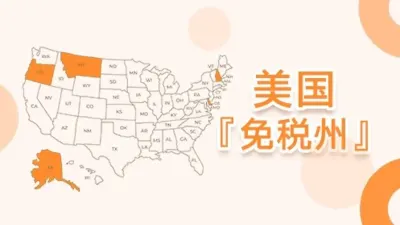
You can use one of the following tax-free state addresses (Delaware is recommended):
- Delaware
- Montana
- New Hampshire
- Oregon
You can use an address provided by a freight forwarder (such as MyUS, Shipito, Stackry, etc.), or search for "Delaware fake address generator".
Example of a Delaware address (for reference only):
yaml复制编辑Name: John Smith
Address: 8 The Green
City: Dover
State: DE (Delaware)
ZIP Code: 19901
Phone: +1 302-555-1234
✅ 2. Steps to Register an Apple ID
Method 1: Register via the Web (Suitable for Computer)
- Open the US official website https://appleid.apple.com
- Click "Create Your Apple ID"
- Fill in the information: Region: United States, First Name, Last Name, Birthday: Optional, Email: Gmail recommended, Password, Security Questions: Set and remember them yourself
- Verify your email and phone number (you can use Google Voice or a SMS verification platform to get a US number)
- Apple ID creation is complete
✅ 3. Set Up Tax-Free Zone Address and Payment Method
After logging into your Apple ID, go to Account Management:
3.1 Visit the Apple ID Management Page:
https://appleid.apple.com/account
3.2 Add a US Address (Billing Address)
Select the Delaware address you prepared earlier.
3.3 Set Payment Method:
- You can temporarily select "None" (no payment method)
- If you need to bind a payment method later, you can use: US Virtual Credit Card (e.g., Privacy.com), Apple Gift Card (US region gift card top-up), US PayPal (not necessary, not recommended for average users)
✅ 4. Log in to the US Account on the App Store
On iPhone or iPad:
- Go to "Settings" > "Apple ID" > "Media & Purchases" > Sign out of the current account
- Log in with the newly registered US Apple ID
- You will be prompted to complete the address information; make sure to fill in the tax-free state address
- Once completed, you can freely use the US App Store and download apps exclusive to the US region
✅ 5. Tips for Tax-Free Purchases of Apple Products
If you use this ID to log in to the Apple official website (apple.com) to purchase hardware products, such as iPhone, MacBook, etc.:
- Your US address will be used by default at checkout
- If the address is in a tax-free zone (e.g., Delaware), the system will automatically not charge sales tax
Note: The item must be shipped to a tax-free zone address (can be coordinated with a freight forwarder), otherwise you cannot enjoy the tax exemption
⚠️ Important Notes
- Apple determines your location based on IP; enable a US node VPN when necessary
- Do not switch accounts frequently or log in to App Stores of different countries/regions repeatedly to avoid account lockout
- Generally low risk for downloading apps; pay attention to address consistency when purchasing hardware
✅ Delaware Apple ID Registration Information Template
📌 Basic Information (You can modify it to your preference)
- First Name: David
- Last Name: Lee
- Email: Use your own Gmail, e.g., davidlee2025@gmail.com
- Password: Set it yourself, ensuring it meets requirements (uppercase, lowercase, numbers, symbols)
- Country/Region: United States
- Phone (US Number): +1 302-351-1234 (or use Google Voice, SMS verification platform)
✅ Address Information (Real Freight Forwarder Address Recommended)
You can register with one of the following freight forwarders to obtain an address:
1. Stackry (Recommended)
Website: https://www.stackry.com
After registration, you will receive a real address in Delaware, typically formatted as follows:
yaml复制编辑Your Name: David Lee
Street Address: 68A Stiles Road Unit #12345
City: Salem
State: New Hampshire (Tax-Free State)
ZIP Code: 03079
Phone: +1 781-219-1234
Although Stackry's headquarters are in New Hampshire, it is also a tax-free state.
2. Shipito
Website: https://www.shipito.com
After registration, you can choose a tax-free state address, such as Oregon or Nevada. You can select the tax-free Oregon warehouse:
yaml复制编辑Your Name: David Lee
Street Address: 8306 N. Lombard St. #XXXXXX
City: Portland
State: OR (Oregon)
ZIP Code: 97203
Phone: +1 310-349-1182
3. MyUS (Suitable for Purchasing and Then Forwarding)
Website: https://www.myus.com
After successful registration, you will be assigned a tax-free state address (usually Delaware or Florida; note that Florida is not tax-free).
✅ Apple ID Payment Setup Suggestions
For initial setup, you can choose:
- Payment Method: None
- For future purchases or downloading paid apps, you can use: US Apple Gift Card (sold on eBay, Amazon), Privacy.com Virtual Credit Card (requires a US bank account), Wise Virtual USD Card (works for some users), US PayPal (binding carries risk, not recommended for beginners)
✅ Registration Tips
- Use a computer browser to register your Apple ID to avoid automatic redirection to the China region.
- Connect your VPN to the Eastern US (preferably a Delaware or New York node) to match your IP with the address.
- If prompted to complete your address when logging into the App Store, simply fill in the freight forwarder address information.








 1
1



