

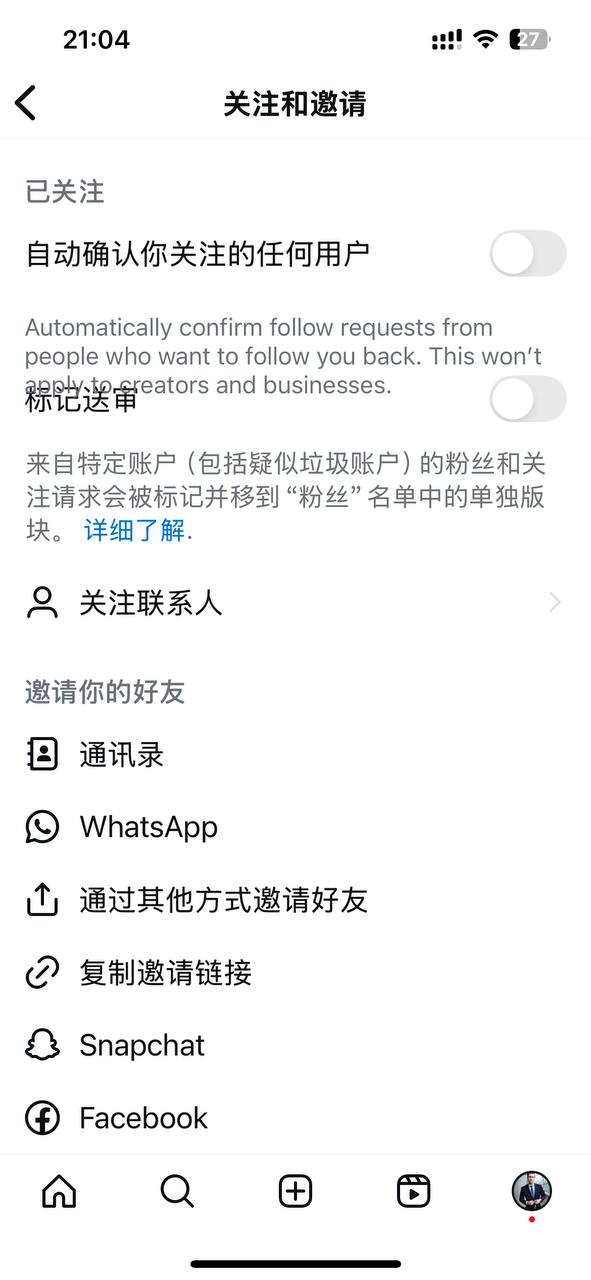
When boosting followers on IG, you need to turn off this option, otherwise it won't work.
-
Open Instagram → Go to your profile (avatar).
-
Tap the menu in the top right corner → Settings and privacy.
-
Type "follow" in the search bar at the top, or scroll down to find Follow and invite friends.
-
Once inside, turn off the toggle for Flag for review.
Additional notes:
-
After turning it off, it will only stop placing "new followers" into "Flagged for review"; accounts that were already flagged will remain in the "Flagged" list, and you will need to handle them individually or delete them in bulk from your Profile → Followers page.
-
Some accounts may experience a bug where the toggle is off but new flagged followers keep appearing. This is an Instagram-side issue, and usually you can only wait for a fix or continue manual cleanup.
Can't find this toggle? Try:
-
Update Instagram to the latest version and restart the app;
-
Search for follow directly in the search bar at the top of "Settings and privacy";
-
The path may vary slightly between iOS/Android, but it is always under Settings and privacy → Follow and invite friends;
-
If you still don't see it, it is likely a gradual feature rollout and may not be available for your account yet.
The "Flag for review" toggle is currently not visible on the PC web version; it can only be turned off in the Instagram mobile app. The official help guide also states the path as "In the Instagram app... → Follow and invite friends → Turn off Flag for review".









 1
1



